
When a cleaning company automates bookings, the aim is straightforward: a customer describes the job on the website, gets a fixed price, pays securely, and the right cleaner is notified — without anyone copying details from WhatsApp into a spreadsheet, then into a diary, then into a bank transfer chase.
This guide explains where cleaning firms lose time in the quote-to-job journey, what a joined-up booking system needs to cover, and how the stages fit together from the first form submission to aftercare. It is the kind of workflow our operational automations and dispatch service is built for, and we walk through a real example from Northbank Cleaning in Hull.
This article is general information about business software and processes, not legal, tax or employment advice. Rules on payments, cancellations and worker documentation depend on how you trade, so check current guidance or take professional advice where needed.
Where cleaning firms lose time today
Follow a typical clean through a growing domestic or commercial cleaning business and the same information is typed, messaged or rewritten several times:
- An enquiry arrives by phone, WhatsApp, Facebook message or a basic website form.
- Someone estimates a price from memory, an old spreadsheet or a rough site visit note.
- The quote goes out by text or email. The customer replies somewhere in a long thread.
- A deposit is requested by bank transfer and matched by hand when it lands.
- The job is written on a whiteboard, in a shared calendar or in a group chat for the cleaners.
- Reminders, access notes and “are you still coming?” messages are handled one by one.
Each hand-off is a chance to lose the postcode, underprice extras, double-book a slot or forget to confirm. It also hides the true cost of admin. Our article on the true cost of manual admin shows how quickly spreadsheet and chat-based work adds up once you cost staff time properly.
The pain shows up differently depending on how you trade. Domestic firms feel it most on evenings and weekends, when customers expect a quick reply and the office phone is quiet. End-of-tenancy and after-builders jobs create one-off pricing debates. Commercial contracts and holiday-let changeovers need reliable recurring diaries. In every case the root problem is the same: the job never lives in one place.
What a quote-to-dispatch booking system needs to do
Off-the-shelf booking calendars are fine for a simple hourly slot. Cleaning work is usually more complex: different services, property sizes, condition, parking, short notice, weekends, recurring cleans and teams of more than one person. A system that actually replaces WhatsApp and the whiteboard typically needs to:
- capture a structured enquiry for each service type;
- price most jobs from rules, and flag bespoke work for a human quote;
- send a private quote the customer can open, revise and accept on their phone;
- take payment or a deposit when they accept;
- create the booking and hold the diary slot;
- offer or assign the job to available cleaners;
- send reminders by email and SMS;
- support recurring plans, rebooks and aftercare without starting from scratch.
That is the same enquiry-to-payment idea we describe in automating quotes and invoices, applied to field work rather than workshop jobs. Related reading for trades and field teams includes our guide to job management software for East Yorkshire firms.
Think of it as one chain: enquiry → quote → payment → booking → dispatch → reminders → aftercare. If any link still depends on copy-paste, the whole chain slows down when the diary fills up.
1. Capture the enquiry in a guided quote form
A multi-step form beats a free-text “tell us what you need” box. For cleaning, the useful questions usually include the service type, property size, bathrooms, furnished or empty, condition, parking, pets, access and preferred date. Photos help for end of tenancy and after-builders work.
The form should check that you cover the postcode before the customer invests time, and it should never show prices in the page source that a competitor can scrape. Pricing belongs on the server, driven by a maintained catalogue of services, extras and surcharges.
Good forms also set expectations early: how long a typical clean takes, whether parking is charged, what happens on short notice, and when a site visit is required. That reduces the “I thought it was included” emails after the quote lands.
2. Give every quote a private client area
Emailing PDFs creates version chaos. A better pattern is a tokenised quote page inside a client portal: the customer sees one current price, the job details, what is included, the cancellation policy and a clear accept button. They can change the date or extras and get an updated quote without phoning the office.
That also gives you an audit trail — viewed, revised, accepted — which settles later arguments about what was agreed. For the security side of portals, see our plain-English guide to client portal security.
Returning customers should not fill the full form again. A signed-in client area with past quotes, upcoming cleans and a one-tap rebook path is usually where the admin saving becomes obvious after the first few weeks.
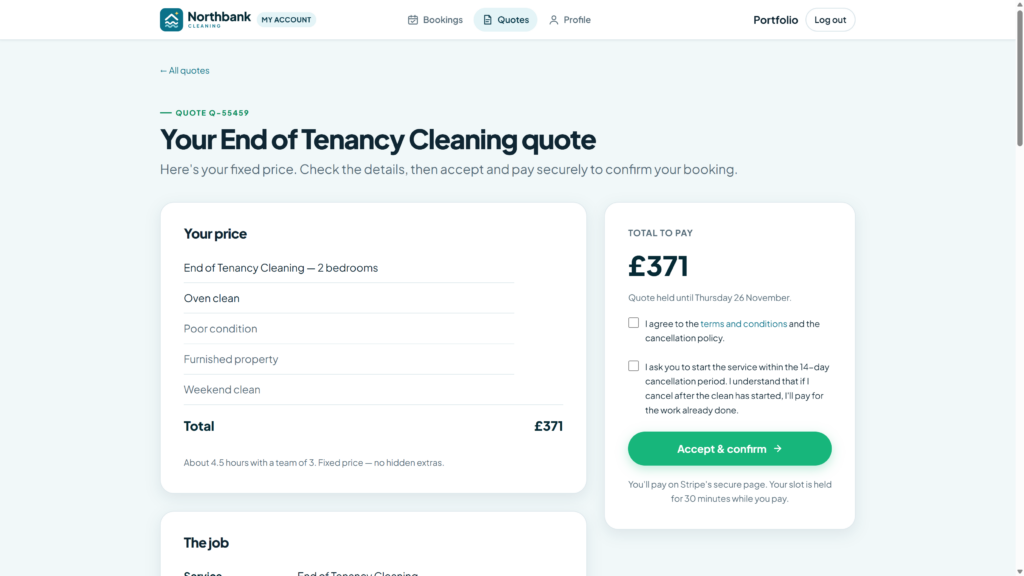
3. Take payment when the quote is accepted
For most domestic cleans, taking payment (or a deposit) at acceptance protects the diary and cuts no-shows. Card checkout through a provider such as Stripe means the booking is only confirmed when the money is authorised, and the office is not matching bank transfers to job references at the end of the day.
Payment belongs in the same flow as the quote. Our software and financial integrations work is often about joining that acceptance step to Stripe, Xero or QuickBooks so finance and operations stay in step. More on deposits and online payments is in taking deposits and payments online.
Decide your rules before you automate them: full payment for short one-offs, deposit plus balance for larger jobs, or invoice terms for approved commercial accounts. The software should enforce those rules, not leave them as a verbal habit.
4. Dispatch the job to cleaners automatically
Once a booking is paid, someone still has to get a cleaner on site. Manual dispatch — ringing round, posting in a group chat, hoping the right person sees it — does not scale. An automated dispatch layer can:
- match cleaners by area, availability, skills and how many jobs they can take in a day;
- send timed offers with the service, district, length and pay;
- let the first suitable cleaner accept, then notify the others;
- escalate to the office if nobody takes it within a set window;
- tell the customer when a cleaner is assigned, if you want that message to go out.
Cleaners need their own mobile-friendly portal for offers, upcoming jobs, availability, documents and bank details. That is field dispatch in practice, not just a calendar with colours on it. We cover the wider pattern in job scheduling and dispatch software for field service.
Offer design matters. Too many vague offers and cleaners ignore them. Too few, and the office is back on the phone. Start with clear pay, travel area and job length, and keep a short office override for VIP clients or last-minute cover.
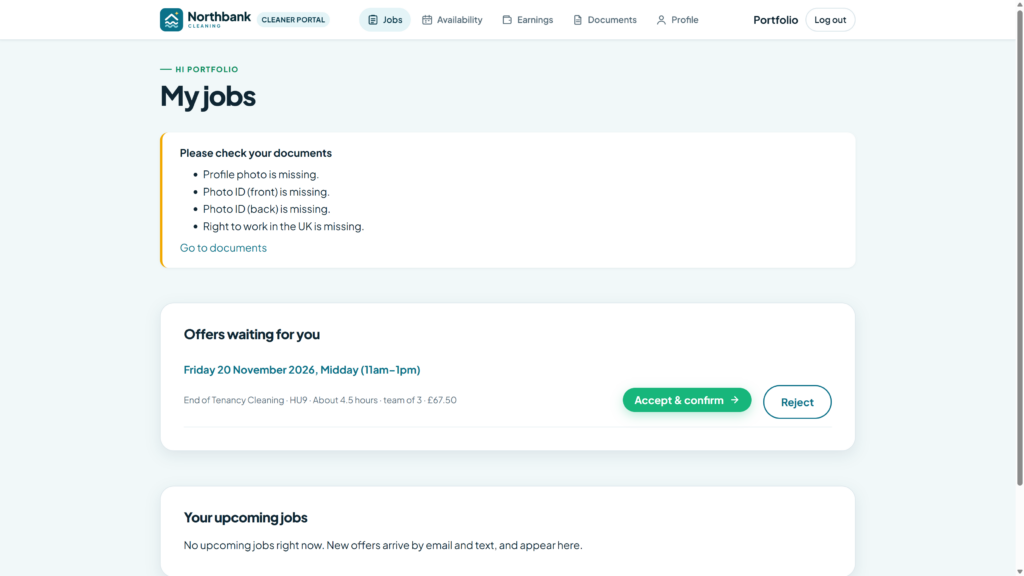
5. Reminders, recurring cleans and aftercare
One-off jobs are only part of a cleaning diary. Regular house cleans, holiday-let changeovers and commercial contracts need recurring schedules, with clear rules for how far ahead visits are generated, when they are charged and how customers change a date. After the clean, automated aftercare — a thank-you, a review request, a rebook link — keeps the relationship warm without another manual email.
All of this works best on a background job queue, so reminders and offers still go out when nobody is in the office. If your current tools are a patchwork of forms, sheets and chat apps, that is usually the signal to consolidate rather than add another subscription. The same thinking sits behind our wider advice on when no-code tools stop scaling and when a purpose-built workflow is cleaner.
A real example: Northbank Cleaning in Hull
Northbank Cleaning is a Hull and East Yorkshire cleaning company taking bookings seven days a week. We built Bookings, a custom WordPress plugin that runs their journey from website enquiry to paid job.
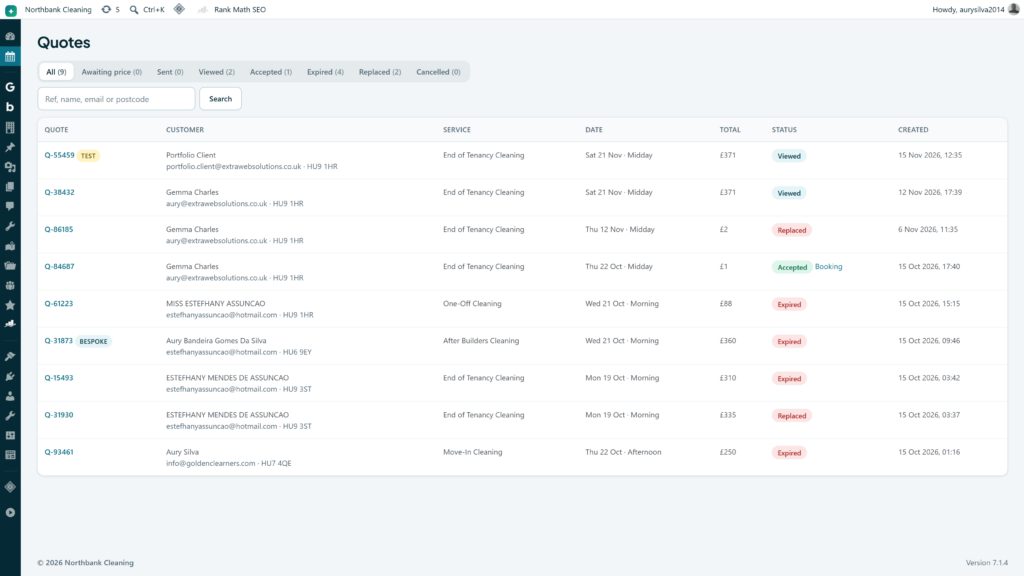
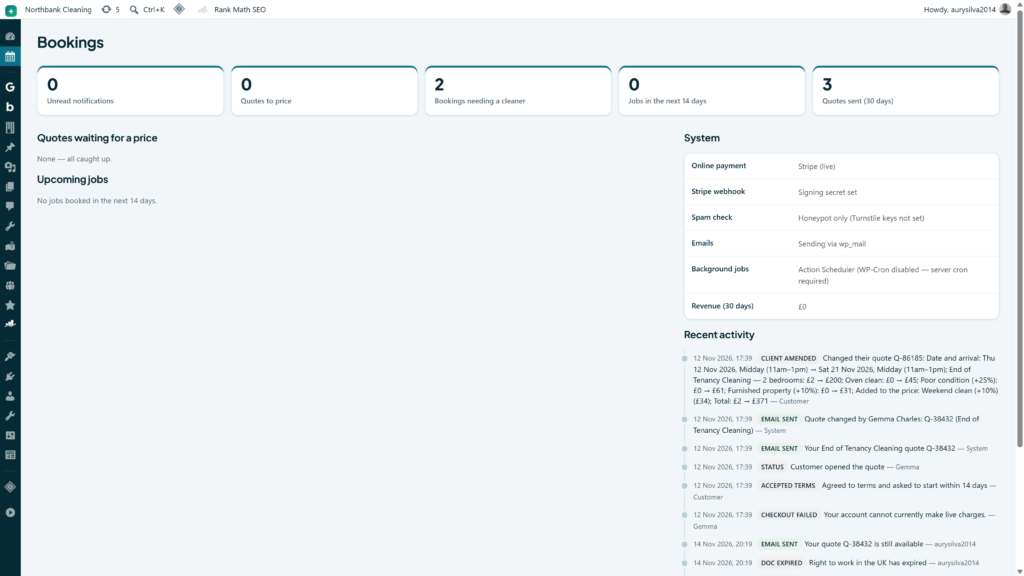
Customers use a five-step quote form covering more than a dozen services, from regular house cleans to end of tenancy and commercial work. Most jobs are priced instantly from configurable rules — team size, condition, parking, short notice and weekends included — while bespoke work is flagged for a personal quote. Every quote lands in a private client area. Customers pay through Stripe Checkout, and the office sees quotes, bookings and dispatch in one admin cockpit. Cleaners get job offers, set availability by area and hours, and manage documents on their phone.
Before Bookings, quotes were living in WhatsApp and the diary was a spreadsheet. Now customers get a fixed price on the site, pay through Stripe, and our cleaners see job offers on their phones — the office finally has one place for the whole journey.
Northbank Cleaning
You can see screenshots of the admin, client and cleaner areas in the Northbank Cleaning Bookings case study. The project sits alongside their public website, so the brand, quote journey and back office feel like one product rather than three bolted-on tools.
Off-the-shelf booking tools vs a custom system
There is no single right answer for every cleaning firm.
Use a standard booking calendar
If you sell simple hourly slots with one price and one cleaner, a packaged booking plugin or SaaS calendar may be enough. Keep your price list short and your exceptions rare.
Connect specialist field-service software
Some job management products already include quoting, scheduling and invoicing. They work well when your process fits their model and they connect cleanly to your accounts package.
Build a custom quote-to-dispatch workflow
Custom makes sense when your pricing rules are specific, when you need both a public quote journey and a cleaner portal, when recurring and one-off work share the same diary, or when you are stitching so many tools together that the gaps recreate the re-keying you wanted to remove. That is the path we took for Northbank, on WordPress, with Stripe and a dispatch layer designed around how their office and cleaners actually work.
A useful test: write the journey on one page, from first form field to cleaner accepted. If more than half the steps still say “someone copies this into…”, packaged tools alone are unlikely to fix it.
How to plan a project without boiling the ocean
You do not need every feature on day one. A sensible sequence for most cleaning firms looks like this:
- Catalogue and pricing. Agree services, extras, surcharges and which jobs always need a human quote.
- Public quote form and private quote page. Get customers out of WhatsApp first.
- Payments. Confirm the diary only when card payment or an approved account rule says so.
- Cleaner portal and offers. Replace the group chat with structured dispatch.
- Recurring plans and aftercare. Lock in the weekly and fortnightly work that keeps the diary full.
Each stage should leave the office with less re-keying than before. If a stage only adds screens without removing a spreadsheet, pause and simplify.
Common pitfalls to avoid
- Pricing rules nobody owns. Automation repeats mistakes. Someone must review labour rates, extras and surcharges regularly.
- Accepting jobs before payment clears. If the diary fills on “I’ll pay on the day”, no-shows come back.
- Dispatch without availability data. Offering every job to every cleaner creates noise. Areas, hours and max jobs per day matter.
- Documents and right-to-work left in email. Cleaner portals should hold ID and compliance files with expiry reminders, not a shared drive of photo attachments.
- No human check on bespoke work. After-builders, large commercial and odd-access jobs still need a person to price them.
- Training only the office. Cleaners need a five-minute walkthrough of offers and availability, or they will keep texting the manager.
Cleaning company booking systems: common questions
Can customers get an instant price for every clean?
Often for standard domestic services, yes, if you maintain clear rules. Bespoke work should be quoted by the office, with the same private quote page once the price is ready.
Do cleaners need a separate app from the App Store?
Not necessarily. A mobile-friendly web portal is enough for most teams, and it avoids forcing every cleaner through app store updates. What matters is that offers, job details and documents work well on a phone.
Will this replace our accounts package?
Usually no. The booking system should create clean payment and job records, then hand totals to Xero, QuickBooks or your bookkeeper. Decide which system issues invoices so numbering stays consistent.
How long does a project like this take?
It depends on how many services you price, whether cleaners and customers need portals, and what you already use for payments. A focused quote-to-booking flow can be live in stages: form and pricing first, then payments, then dispatch and recurring plans.
What about GDPR and customer photos?
Only collect what you need for the clean, store photos securely, and set a clear retention period. Our guides on client portal security and data retention for UK businesses cover the practical side.
The bottom line
Cleaning companies do not lose hours to cleaning — they lose them to re-keying quotes, chasing deposits and ringing round for cover. A quote-to-dispatch booking system captures the job once, prices it consistently, takes payment on acceptance and puts the right cleaner on the diary with far fewer phone calls.
If you want to see what that could look like for your own team, look at how we built it for Northbank Cleaning, or tell us how bookings run today and call us on +441482 212499. We will map the journey with you and show where the spreadsheet and group chat can go.